How to safely uninstall Smind Sections
Uninstalling is safe by design: Smind Sections never overwrites your original theme files, so removing the app cannot break your theme. Here is what happens and the right order to do it.
Before you uninstall
Decide what to do with sections currently on your pages. If you want to keep your layout, replace Smind sections with your theme’s own sections first.
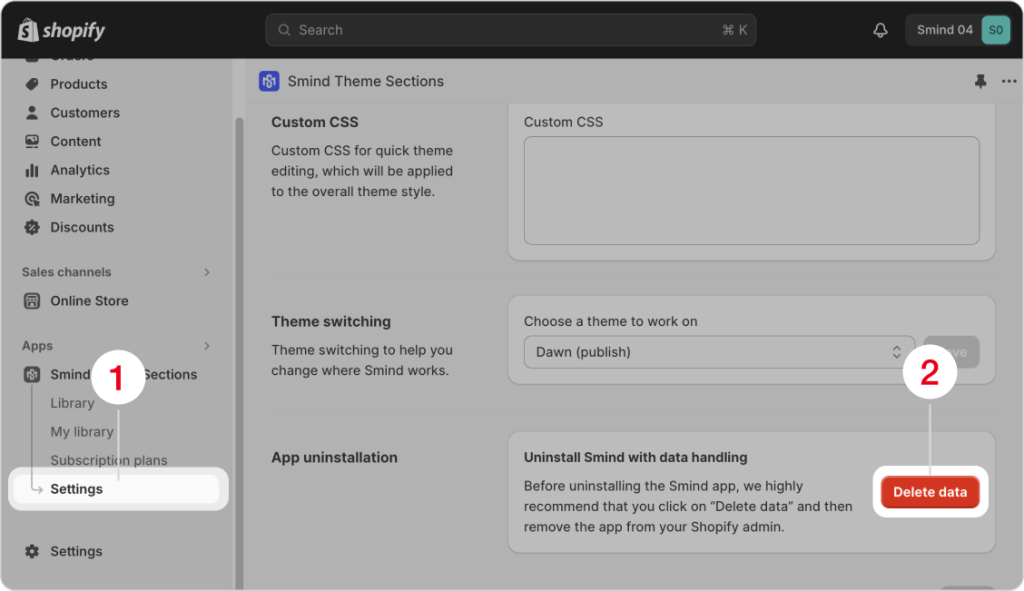
Delete Smind Data
Before uninstalling the Smind app, we highly recommend that you click on “Delete data” and then remove the app from your Shopify admin.
Go to Apps > Smind Sections > Settings > App uninstallation then click on Delete Data
Uninstall the app
- Go to Shopify Settings → Apps
- Find Smind Sections and click Uninstall.
Afer that, billing stops automatically at the end of your current billing cycle. Your current billing cycle will still be charged in full.
Changed your mind?
Reinstall anytime from the Smind App Store listing. Your plan starts fresh, and you can add sections again in minutes.