How To Add Package
How To Install Package
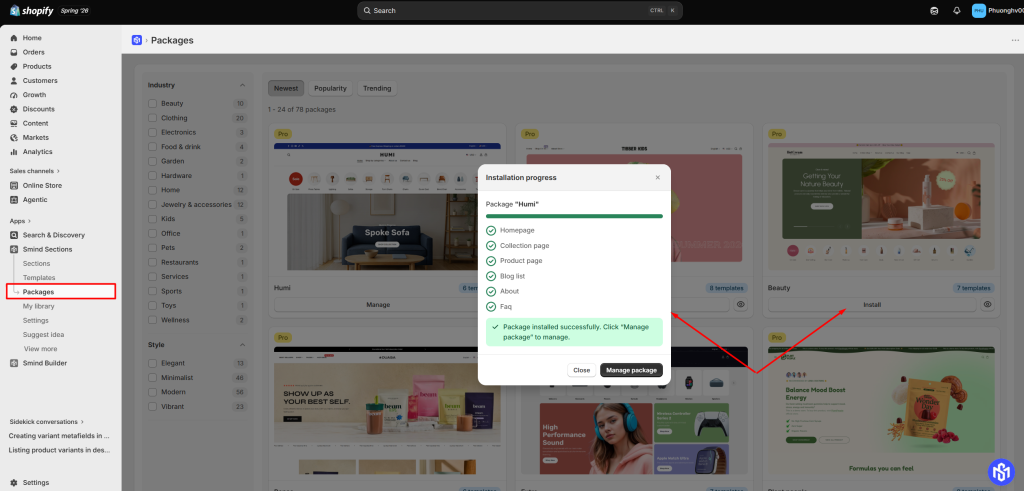
- From our app, click Packages
- In the Packages tab, select the industry or style of packages.
- Click Install the package you like.
- Click Install then Smind will set it up in your theme
Once done, system show “Package installed successfully. Click “Manage package” to manage.”
How To Manage Package
You can manage your package in either of the following ways:
- In the popup after installing a package, click Manage Package.
- Or, from our app:
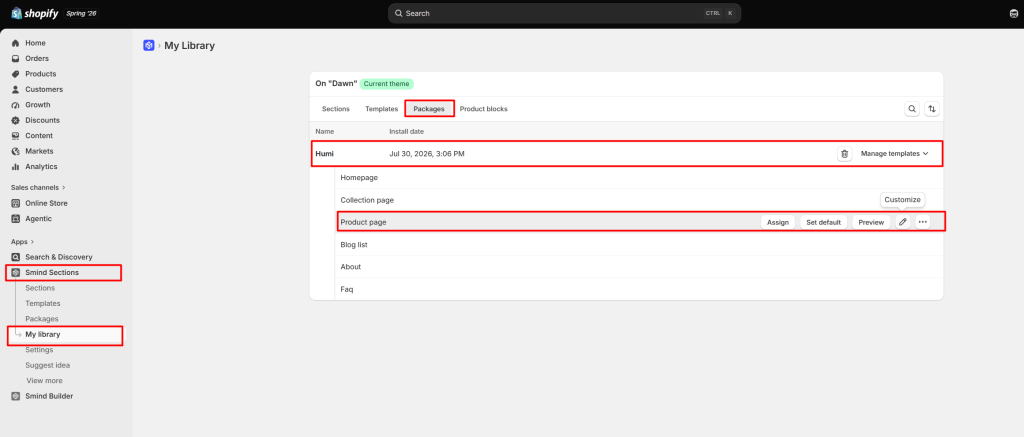
- Go to My Library.
- Select the Packages tab.
- Find the package you want to manage and click Manage Templates.
On the Manage Templates page, you can manage each page template included in the package. Available actions include:
- Set as Default – Make the template the default for its page type.
- Preview – View the template before applying it.
- Customize – Open the template in the Theme Editor to make changes.
Did this answer your question?
If anything is unclear, tell us — we improve docs weekly.